By Overchat Editorial Team — Style Technology Desk. Expert editorial guide based on the target product workflow and documented capabilities, updated October 2026.
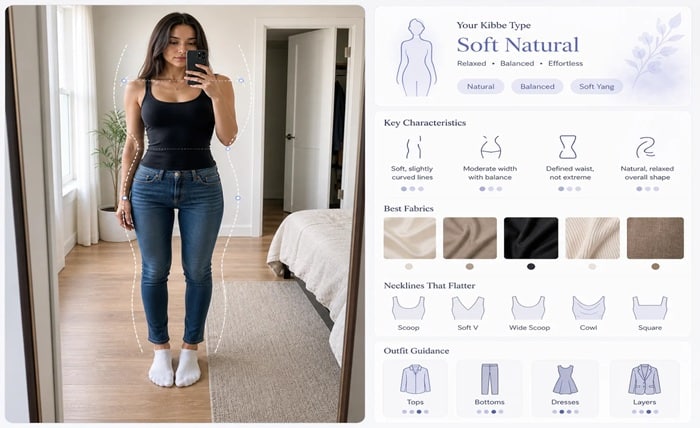
Upload one full-body photo and press Find My Kibbe Type. The tool does not edit your photo: it returns a report card with your closest Kibbe type, its family, your yin/yang balance, a four-point line analysis, celebrity matches and style tips.
What you need before you start
The Kibbe system, created by stylist David Kibbe, sorts people into Image Identities by the balance of yin (soft, rounded) and yang (sharp, long, angular) lines. The original system has 13 types in five families: Dramatic, Natural, Classic, Gamine and Romantic; Kibbe later trimmed the system to 10 types.
The test is a style-oriented suggestion rather than a medical or scientific body classification. Use the result as a styling hypothesis and compare its line analysis with what you actually see in your photo and how different silhouettes feel on you.
How to do it with Overchat AI
Open the dedicated Kibbe Body Type Test page. This is the target workflow used throughout the instructions below.
Step 1: Choose the cleanest source
Start with a full-body photo with neutral posture. Pick a source where the relevant subject is visible and not hidden by cropping, glare, compression or foreground objects. If you have several candidates, prefer the image that looks ordinary and representative rather than the most heavily edited one.
Step 2: Open the dedicated Overchat tool
Open the Kibbe Body Type Test because it is built to match one full-body photo to one of the 13 Kibbe types and show which family it belongs to.
Step 3: Upload one full-body photo
Upload a clear full-body photo with neutral posture and press Find My Kibbe Type. The tool analyzes the photo; it does not crop, retouch or reconstruct it.
Step 4: Read the report card
Read the closest Kibbe type, its family, yin/yang balance, four-point line analysis, celebrity matches and style tips. Treat the result as a starting point rather than a definitive label.
Step 5: Check the reasoning
Read the line analysis critically: does the evidence for your vertical line, bone structure, body flesh and facial features match what you see in the photo? Also note the ‘Often confused with’ type — it shows the closest alternative.
Step 6: Re-analyze if the result does not fit
If the type does not feel right, use Re-analyze or try a different full-body photo taken in even light and a neutral pose. Changing the source is more informative than treating one result as ground truth.
Step 7: Save or share the report
Save your result with Download my card (a PNG report card), or copy or share it. The downloadable file is the report card, not an edited version of your photo.
Quick workflow checklist
| Step | What to do | What to check |
| 1 | Use one clear full-body photo with neutral posture and even lighting. | Full body visible without extreme perspective |
| 2 | Open the Kibbe Body Type Test and upload the photo; the tool matches it to one of 13 types and shows the family. | Type + family |
| 3 | Read the line analysis and compare its evidence for vertical line, bone structure, body flesh and facial features with the photo. Note the ‘Often confused with’ alternative. | Reasoning and closest alternative |
| 4 | Save the PNG report card, or re-analyze with a different full-body photo if the result does not fit. | Report card or second photo |
How to get a better result
Kibbe-inspired typing focuses on the overall visual impression of line, proportion and balance rather than on a single body measurement. That is exactly where a photograph can mislead: lens choice, pose, clothing and camera height all change apparent proportions. A useful AI tool should therefore explain uncertainty instead of pretending that one image is definitive.
For a more useful result, use a neutral full-body photo taken roughly at torso height, avoid extreme wide-angle lenses, and wear clothing that shows your overall line without compressing or exaggerating it. Then compare the recommendation with how different silhouettes actually feel on you.
Use the report as evidence, not as an image edit. Compare the line analysis with your vertical line, bone structure, body flesh and facial features, and pay attention to the closest alternative type when the result feels borderline.
The most useful outcome is a coherent explanation of why one type fits better than another. Camera height, lens choice, pose and clothing can all affect apparent proportions, so a second ordinary full-body photo can be more useful than repeatedly re-analyzing the same image.
Common mistakes to avoid
- Using a low-resolution or heavily compressed source. The AI can create plausible detail, but it cannot know what the original file never captured.
- Treating the first Kibbe Body Type Test result as ground truth. Generative output is probabilistic, so inspect it and rerun when important details are wrong.
- Changing too many variables at once. Controlled iterations make it easier to learn whether framing, source quality or the generated effect caused the problem.
- Ignoring the category limitation: Kibbe typing is a style framework, not a medical or scientific body classification. Treat an AI result as a styling hypothesis rather than a definitive label.
Frequently asked questions
How many Kibbe types does the test use?
The tool matches your photo to one of 13 Kibbe types and also shows the family it belongs to. The report includes an “Often confused with” alternative when another type is close.
How accurate is an AI Kibbe result?
Treat it as a styling hypothesis, not a definitive classification. Pose, clothing, lens choice and camera height can change apparent proportions, so compare the report with your own visual assessment and, if needed, try another neutral full-body photo.
What should I do if the type does not feel right?
Use Re-analyze or upload a different full-body photo with neutral posture and even lighting. Compare the new line analysis and the “Often confused with” alternative instead of optimizing one image until you get a preferred label.
Can I save my Kibbe result?
Yes. You can use Download my card to save a PNG report card, or copy or share the result.